Step 1
Login to your account at www.tryhealium.com/login
Step 2
Access the subscriptions page by clicking the "My Profile" tab from the drop-down menu in the top right corner. 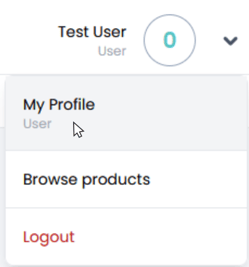
Step 3
Navigate to "Subscription."
Step 4
Select "Manage Subscription." (This will open a new window.)

Step 5
Enter your email in the required field. This will send you an email to Stripe's secure customer portal. From here, you can update or cancel your subscription.
If You Subscribed Through One of the App Stores
Apple App Store - Manage Account or Request Refund
NOTE
If you have subscribed using the Apple App Store, you must manage your subscription or request a refund through them.
For additional information on managing your subscriptions, visit:
Apple App Store
Google Play Store - Manage Account or Request Refund
If you have subscribed using the Google Play Store, you must manage your subscription or request a refund through them.
For additional information on managing your subscriptions, visit: